MDM Configuration Status
This article provides an overview of the MDM Status tab within the Home Page. The purpose is to provide an overview of the current status of the clearMDM configuration per each Target Object and whether there are any actions that need to be taken. The following blog post also provides further information.
We will look at each panel in turn:
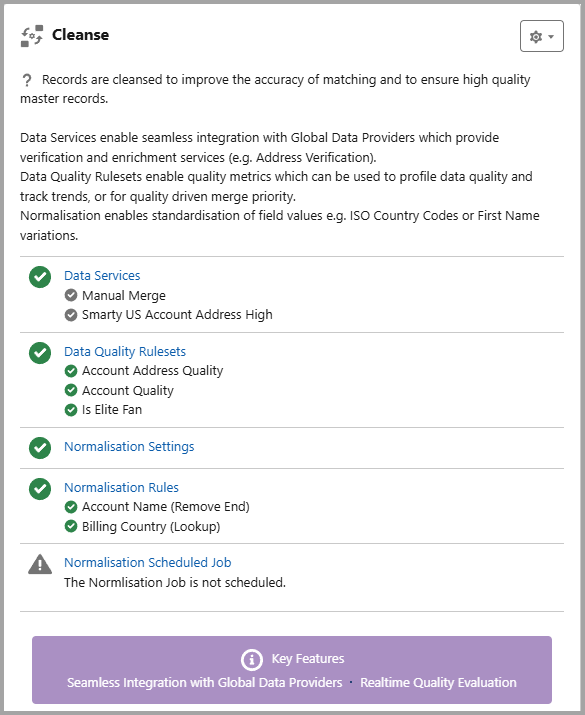
Cleanse
Records are cleansed to improve the accuracy of matching and to ensure high quality master records. Data Services enable seamless integration with Global Data Providers which provide verification and enrichment services (e.g. Address Verification). Data Quality Rulesets enable quality metrics which can be used to profile data quality and track trends, or for quality driven merge priority. Normalisation enables standardisation of field values e.g. ISO Country Codes or First Name variations.
Within this panel there are links to Data Services, Data Quality Rulesets, Normalisation Settings and the Normalisation Scheduled Job. Each section provides an overview of the active/inactive status and valid configuration. Where there is an amber warning, if you hover over this, a summary of the issues are displayed in a popup.
Match
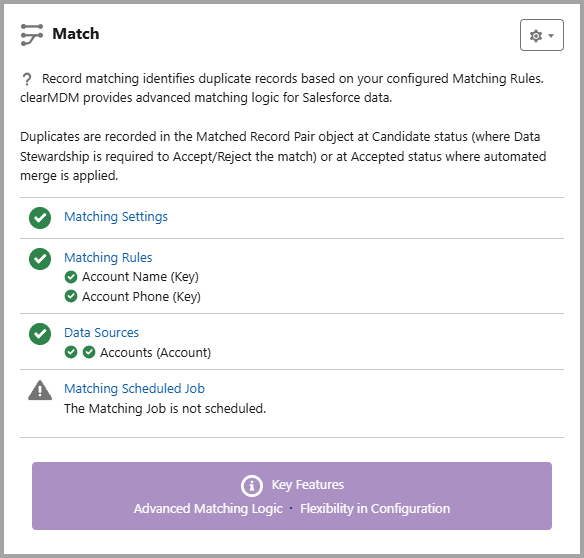
Record matching identifies duplicate records based on your configured Matching Rules. clearMDM provides advanced matching logic for Salesforce data. Duplicates are recorded in the Matched Record Pair object at Candidate status (where Data Stewardship is required to Accept/Reject the match) or at Accepted status where automated merge is applied.
Within this panel there are links to Matching Settings, Matching Rules, Data Sources and Matching Scheduled Jobs.
Each section provides an overview of the active/inactive status and valid configuration. Where there is an amber warning, if you hover over this, a summary of the issues are displayed in a popup.
Merge
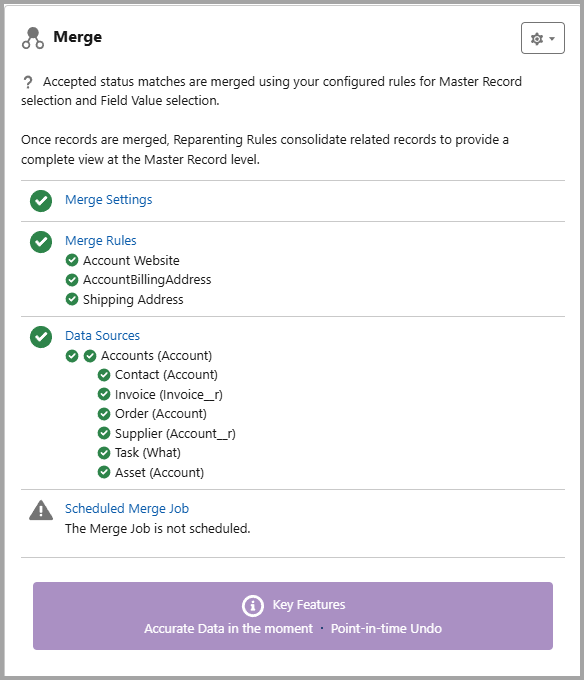
Accepted status matches are merged using your configured rules for Master Record selection and Field Value selection. Once records are merged, Reparenting Rules consolidate related records to provide a complete view at the Master Record level.
Within this panel there are links to Merge Settings, Merge Rules, Data Sources and Scheduled Merge Jobs.
Each section provides an overview of the active/inactive status and valid configuration. Where there is an amber warning, if you hover over this, a summary of the issues are displayed in a popup.
Data Stewardship
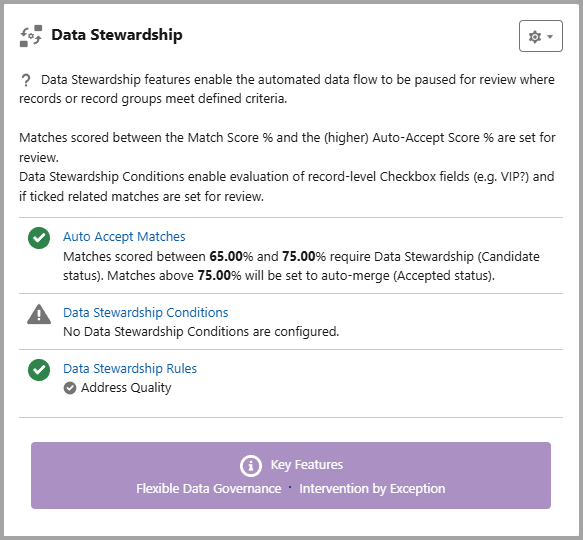
Data Stewardship features enable the automated data flow to be paused for review where records or record groups meet defined criteria. Matches scored between the Match Score % and the (higher) Auto-Accept Score % are set for review. Data Stewardship Conditions enable evaluation of record-level Checkbox fields (e.g. VIP?) and if ticked related matches are set for review.
Within this panel there are links to Auto Accept Matches, Data Stewardship Conditions, and Data Stewardship Rules.
Each section provides an overview of the active/inactive status and valid configuration. Where there is an amber warning, if you hover over this, a summary of the issues are displayed in a popup.
The following Demo also provides an overview of the clearMDM Configuration Status.
To find out more about the MDM Configuration Status tab, please do not hesitate to contact us at hello@clearmdm.com.
Article last reviewed: 2026-02-05