Package Installation
v9.89 Summer 26 – Customer Relationships
-
Added
clearMDM Summer 26 (v9.89) Release Notes.
Use this URL to install the package into any organization:
https://login.salesforce.com/packaging/installPackage.apexp?p0=04tak000000XT3F
Note: If you are installing into a sandbox organization you must replace the initial portion of the URL with http://test.salesforce.com
Use of clearMDM is subject to our terms and conditions.
-
Added
Customer Relationships
The clearMDM Summer ’26 release introduces flexible relationship management capabilities that allow customers to be connected through virtually any type of relationship directly inside Salesforce.
Examples include:
- Household relationships
- Family relationships
- Colleague relationships
- Professional networks
- Custom relationship types
By combining trusted Golden Records with governed relationship management, organisations can move beyond duplicate reduction and build richer Customer 360 views that reflect how customers are actually connected.
For more information, read the accompanying blog post and training article.
-
Added
Cosmos Theme
The clearMDM Summer ’26 release adds support for Dark Mode when using Salesforce’s Cosmos theme.
-
Improved
New Blocking Key Process Request field
Is Skip Synchornisation? has been added to the Blocking Key Process Request. If TRUE, groups will match and merge and never sync.
This new checkbox field will need adding to the Blocking Key Process Request Page Layout.
v9.81
-
Added
Package Installation
clearMDM Release Notes – v9.81
Use this URL to install the package into any organization:
https://login.salesforce.com/packaging/installPackage.apexp?p0=04tak000000P7kf
Note: If you are installing into a sandbox organization you must replace the initial portion of the URL with http://test.salesforce.com
Use of clearMDM is subject to our terms and conditions.
-
Improved
New Match Type - Fuzzy Strict
Currently, when creating Matching Rules you can select a type of ‘Fuzzy’ and specify a Max Score and a Null Score. When either record that matches has a Null value for the field in question, the Null Score value is applied.
In this release, a new Match Type of Fuzzy Strict has been introduced. This means, if either field has a Null value, then the Null Score value will not be applied.
-
Improved
Data Stewardship Rule Setup
Data Stewardship Rule Setup supports AI Action Types which can be validated when the Batch Job ‘Data Stewardship’ is run.
There is the abaility to be able to setup a Rule for ‘Apply AI Match Score’ or ‘Get AI Match Score.
The following blog post provides further information.
v9.77 Spring 26 – External Object Support
-
Added
Package Installation
clearMDM Release Notes – v9.77
Use this URL to install the package into any organization:
ttps://login.salesforce.com/packaging/installPackage.apexp?p0=04tak000000O9IHAA0
Note: If you are installing into a sandbox organization you must replace the initial portion of the URL with http://test.salesforce.com
Use of clearMDM is subject to our terms and conditions.
-
Added
External Object Support
Spring ’26 introduces External Object Reparenting Rules, enabling organizations to preserve critical relationships between local Standard or Custom Objects (such as Account) and External Objects (for example, Purchase__x) during merge operations.
You can find out more and watch a demo here.
v9.72
-
Added
Package Installation
clearMDM Release Notes – v9.72
Use this URL to install the package into any organization:
https://login.salesforce.com/packaging/installPackage.apexp?p0=04tak000000LXfJ
Note: If you are installing into a sandbox organization you must replace the initial portion of the URL with http://test.salesforce.com
Use of clearMDM is subject to our terms and conditions.
-
Added
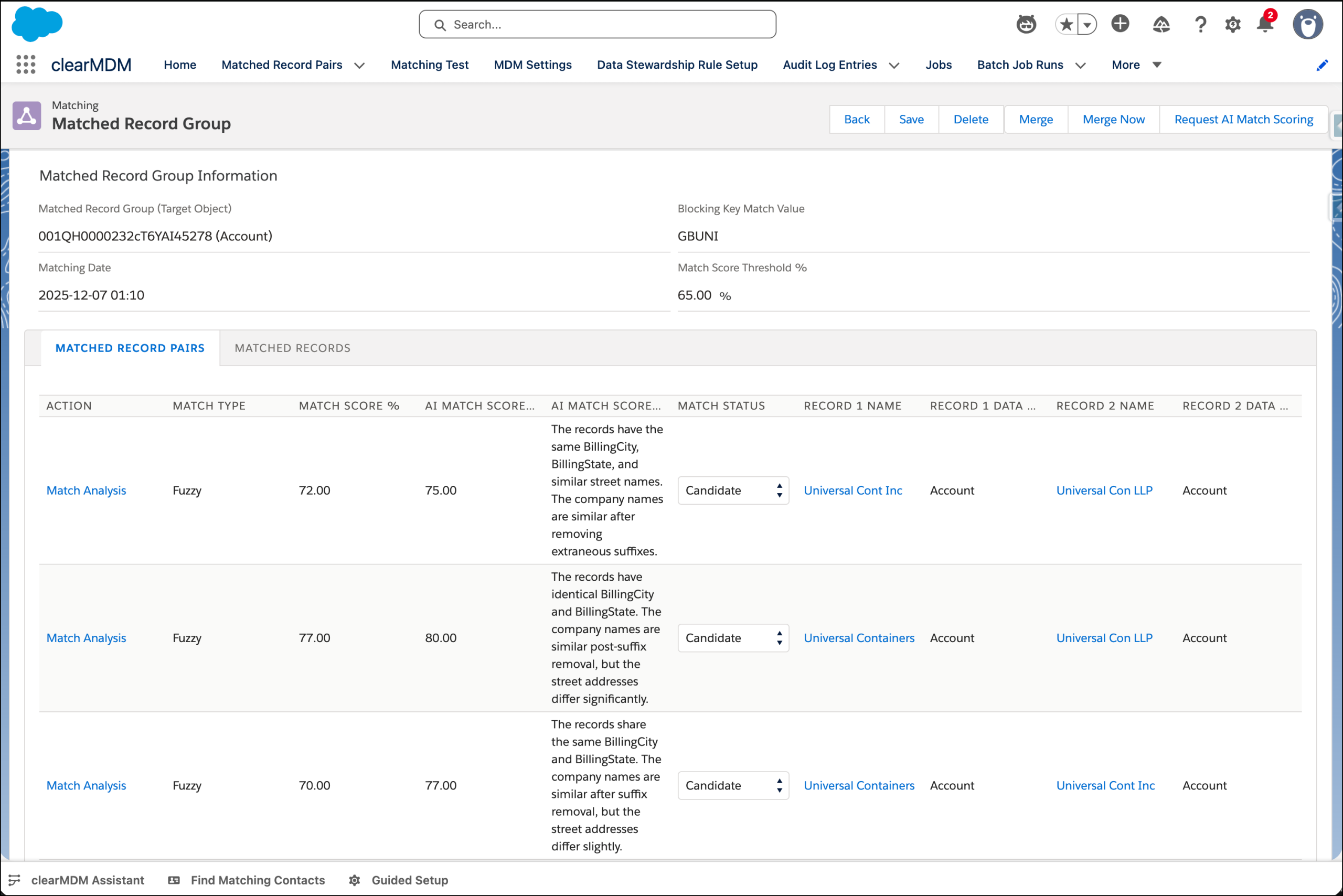
AI Match Scoring
Humans + Agents = Better Data, Faster. The clearMDM Data Steward Agent for Agentforce works alongside human Data Stewards to reduce bottlenecks and deliver quality master data at scale.
The screenshot below shows the new assistive AI Match Scoring capability in action, providing human data stewards with a second opinion either conversationally or integrated into the Data Stewardship UI.
For more information please review this short blog post and contact us. Thanks.
-
Fixed
Bug fixes
General bug fixes across the application.
v9.62 Winter 26
-
Added
Package Installation
clearMDM Winter 26 (v9.62) Release Notes.
Use this URL to install the package into any organization:
https://login.salesforce.com/packaging/installPackage.apexp?p0=04tKk000000HDgD
Note: If you are installing into a sandbox organization you must replace the initial portion of the URL with http://test.salesforce.com
Use of clearMDM is subject to our terms and conditions.
-
Added
MDM Status Configuration Page
A new page has been added within the Home tab, which displays the current configuration status of your MDM settings per Target Object.
There are four panels showing the Cleanse, Match, Merge and Data Stewardship configuration status. Each panel also provides links to the relevant MDM Settings to make any required changes.
The following blog post provides further information.
-
Added
Data Quality Ruleset - Master Record Priority
The Master Record Priority (first factor), can now be referenced to a Data Quality Ruleset within the Target Object Merge Settings.
This allows for the Master Record to be selected based upon a specific Data Quality action, e.g. Address Quality.
The second factor can also be determined in the case of a tie, using newest or oldest dates.
The following Training Article provides further information.
-
Added
Data Quality Ruleset - Attribute Groups
As with the Master Record Priority, there is now the ability to be able to select a Data Quality Ruleset as a point of reference for an Attribute Group (Merge Rule). Prior to this release, priority could be decided, by dynamic, newest or oldest factor.
The following Training Article provides further information.
-
Added
Data Stewardship Rule Setup
A new feature has been added which provides the ability to be able to setup Data Stewardship Rules. The configuration panel provides flexibility on evaluation types, fields to reference and also the ability to be able to create a rule using a Data Quality Ruleset.
The following blog post provides further information.
-
Improved
Scheduled Job Enhancements
With Winter ’26, you can now schedule jobs with a record limit, specify a sort field and direction, and apply a filter using a chosen field and value.
The following blog post provides further information.